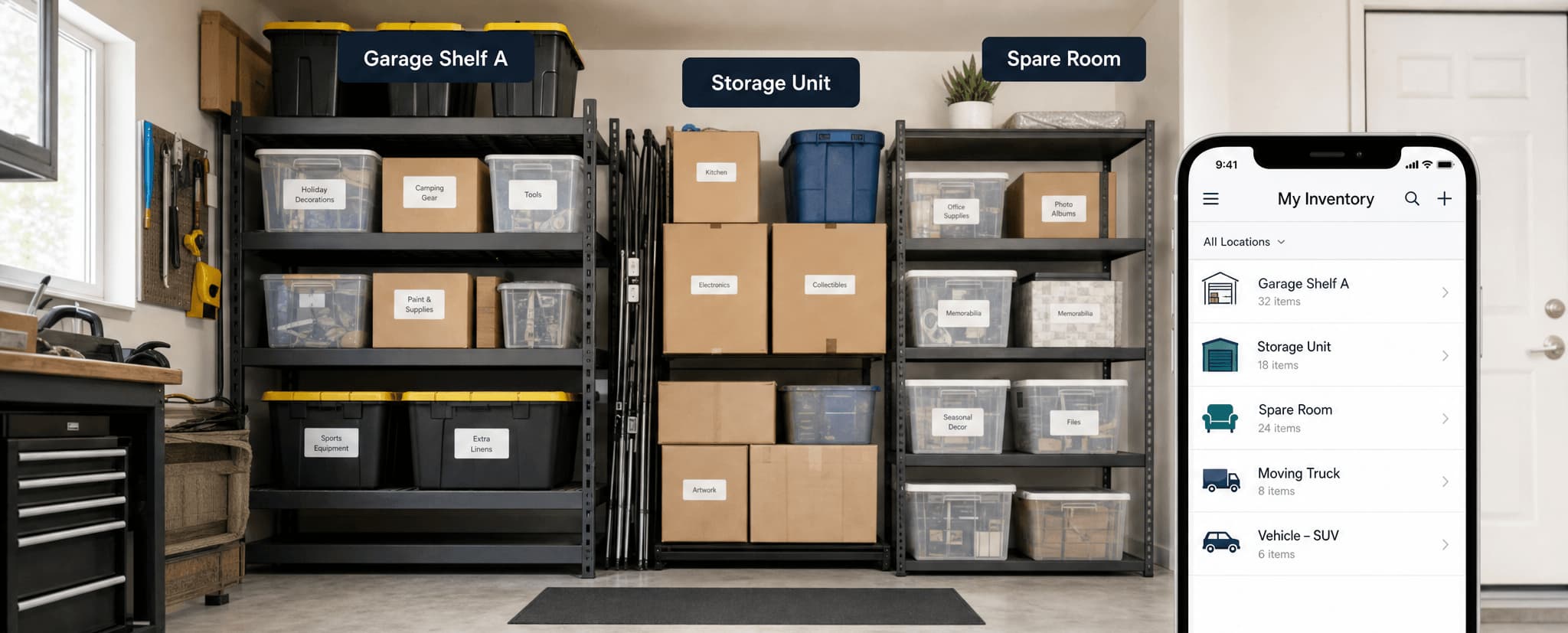
Most storage units start organised and deteriorate within a few months. Items get added without being logged. Boxes get moved without labels being updated. Within a year, the unit becomes a room-sized guessing game.
This guide covers how to set up a storage unit that stays organised — and more importantly, stays findable.
Why storage units fail
The problem is rarely space. It's usually system. Boxes get placed without labels, or with labels so vague — "stuff", "misc", "bedroom things" — that they're useless months later. Items get added over time without any record. The same item ends up stored in multiple places without anyone knowing. Access becomes difficult because nothing has an assigned location.
The solution isn't just physical organisation. It's a combination of physical layout and a digital inventory system working together.
Step 1: Start with a full audit
Before organising, audit what's actually in the unit. Pull everything out if possible. Group items by category:
Tools and hardware — DIY equipment, gardening tools
Business or work — archived documents, equipment
Children's — outgrown toys, old school items, baby gear
Unknown — the honest category for anything you haven't looked at recently
During the audit, decide what to keep, donate, sell, or discard. There's no point organising items you don't need.
Step 2: Create a digital inventory before repacking
This is the step most people skip — and it's the most important one.
Before anything goes back into a box or onto a shelf, log it in a storage management system. Take a photo of each box's contents before sealing it. Add a description and assign a category. A digital inventory created now will save hours of searching later. When you need something in six months and can't remember which box it's in, a searchable digital record is the only reliable answer.
StorageBuddy is designed specifically for this — combining photo-based inventory with QR labels and location tracking for exactly this use case.
Step 3: Label every box with a QR code
Once boxes are packed and logged digitally, generate a QR label for each one and attach it to two sides of the box — one side is often obscured by stacking. A QR code box tracking system means you can scan any box to see the full contents list, that the label stays accurate even if contents change, and that location can be updated digitally without reprinting. Anyone with access can find what they need by scanning rather than opening.
Physical labels should include the box name (unique and specific — not "Kitchen 1" but "Kitchen — Baking"), a brief contents summary, the category, and the QR code.
Step 4: Organise the unit strategically
With everything labelled and logged, arrange the unit deliberately. Zone by category — keep all seasonal items together, all tools together, all household items together. Zones make retrieval predictable because you always know roughly where to look. Heavy items go at the bottom, always. Items you access seasonally belong near the entrance; things rarely needed go to the back. Use shelving units to take advantage of vertical space, and leave a clear navigation path through the middle — don't sacrifice walkability for packing density.
Step 5: Assign precise locations in your digital inventory
"In the storage unit" is not a useful location. Go further with specifics like "Storage unit — Zone A, shelf 2, box 4" or "Storage unit — back wall, bin 3". A home inventory app that supports location assignments lets you search for any item and get a precise location — not just a general area.
StorageBuddy supports location management across multiple properties and units, so you can track items whether they're in a storage unit, a garage, a spare room, or multiple addresses simultaneously.
Step 6: Build a maintenance habit
Organisation degrades without maintenance. Two habits make the biggest difference. First, log before adding — when you bring new items to the unit, add them to your digital inventory before placing them. Never put an unlogged item into storage. Second, review twice a year — schedule a storage check in January and July. Remove items you no longer need, update records for anything that's changed, and confirm the physical layout still matches your digital inventory.
The hybrid system that works
The most effective storage unit organisation combines physical and digital approaches:
Physical
Digital
Category zones
Inventory entries per item
Strategic placement
Location assignments per box
QR labels on boxes
Searchable digital records
Navigation paths
Status tracking
Bi-annual physical review
Real-time digital updates
Neither half works well without the other. A perfect physical layout is still impenetrable without a searchable record. A perfect digital inventory doesn't help if the physical unit is chaos.
Common storage unit mistakes to avoid
Unlabelled boxes are the most common problem — anything unlabelled becomes a mystery within weeks. Stacking without structure means items buried under other items can't be reached without disrupting everything around them. Not photographing contents before sealing is an easy mistake that costs hours of searching later.
Mixing categories is another one: when similar items are scattered across different areas, retrieval always requires checking multiple places. And not updating records when things change is perhaps the most insidious — inaccurate records are worse than no records, because they give you false confidence.
FAQ
How do I know what's in a storage unit I haven't visited in months?
With a digital inventory, you can search from your phone without visiting the unit at all. This is why building the inventory before items go into storage is essential — not as an afterthought.
Should I label every single box in a storage unit?
Yes. Every box should have at minimum a unique name and brief contents summary. A QR label linked to a full digital record is the most efficient approach, but any label is better than none.
What is the best way to track storage items long-term?
A searchable digital inventory system combined with QR labels on physical boxes. The digital record persists and can be searched; the QR label provides fast physical access. Together, they create a storage system that remains useful indefinitely.
How do I remember where things are in a large unit?
You shouldn't have to rely on memory. A storage organisation system with location-aware digital records means you can search for any item and get a precise location — without remembering anything.
Can I use StorageBuddy for a storage unit if I'm not moving?
Yes. StorageBuddy is equally useful for long-term storage organisation as it is for house moves. Many users set it up specifically for garages, storage units, and spare rooms — with no move involved.
A well-organised storage unit saves more than space. It saves time, money, and the mental load of managing things you can't see.